FLOKTRON
An operations system for companies — for the owner or manager who runs teams, production and processes. Daily work without manual reminders: morning tasks, one-button replies from the phone, a news radar on your topic and a posting plan. Your AI assistant sets it up; it runs on your computer.
Early preview, open for testing. Free inside your own company.
Runs in a real company. FLOKTRON runs the daily work of an operating manufacturing company: morning tasks, staff replies, mail, invoices, reports and reminders in Telegram. New features work there first, on real everyday actions, and only then go into the open version. To keep data safe, public examples, tests and screenshots use fictional companies only; real company data never leaves the company.
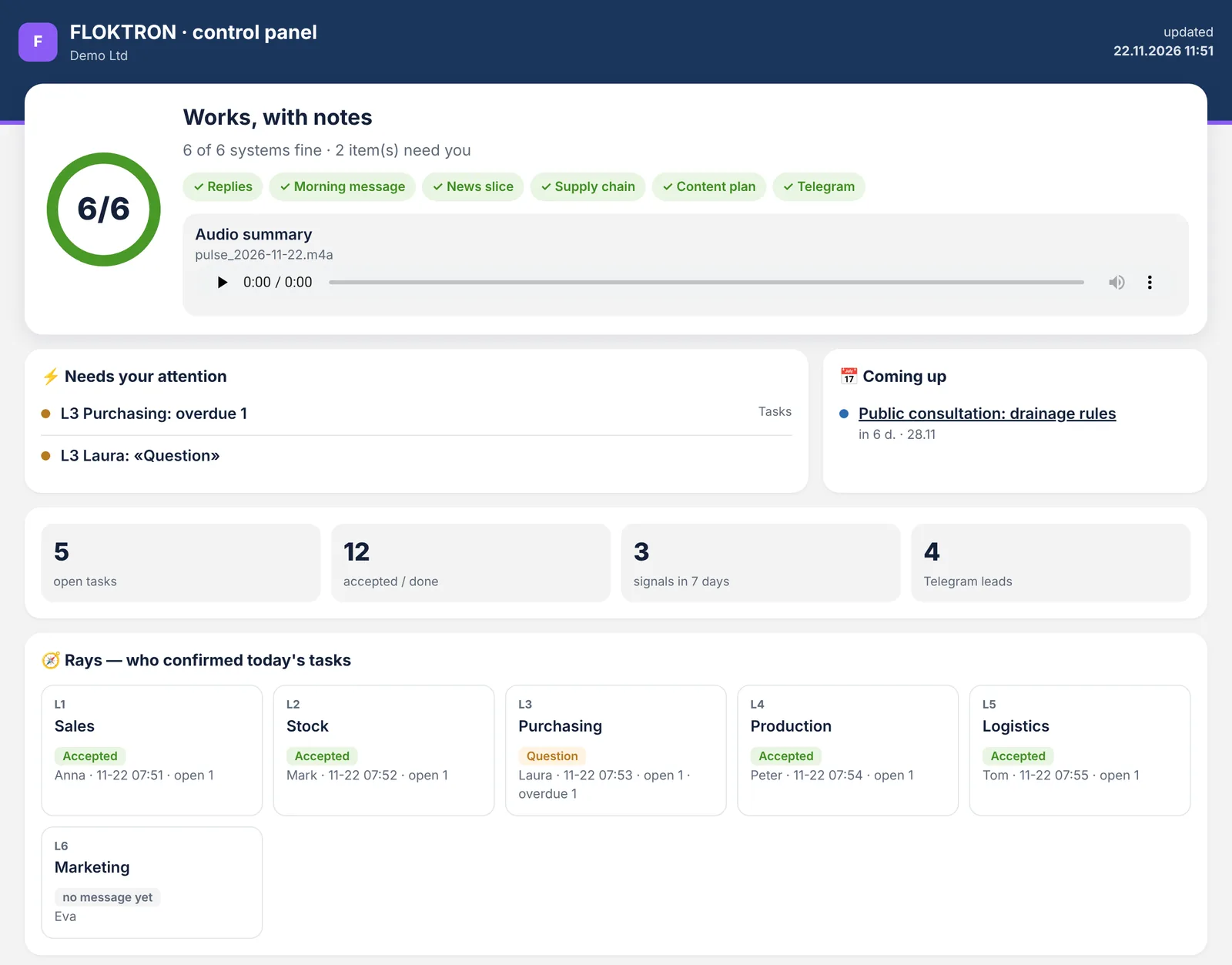
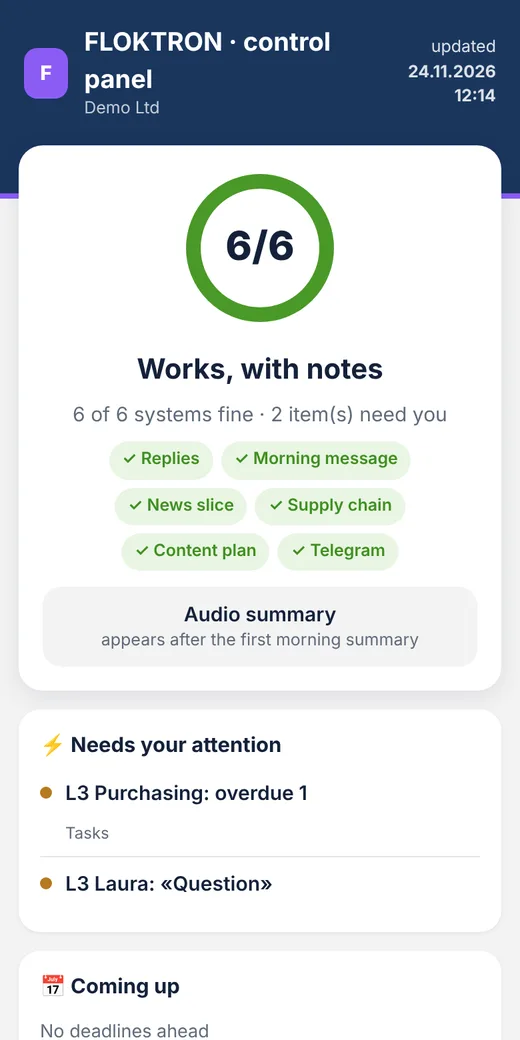
Voice, audio summary and dashboard
● Voice reports
A team member sends a voice message to the Telegram bot. Speech is turned into text on your own computer, saved to the report and sent to the manager. Strangers are asked to type.
● Morning audio summary
The morning pulse as two minutes of audio in Telegram: what works, what is stuck, what is on today. Listen in the car on the way to the site.
● Dashboard
One page: what works, what needs you, who confirmed their tasks, deadlines and radar signals. Opens on the computer and the phone, offline.
By default your voice never leaves your computer — transcription and speech run locally.
What FLOKTRON does
Morning tasks
Every morning each area of work gets its tasks by e-mail. People reply with one button from the phone. When work gets stuck, the question goes to whoever decides.
News radar
News, tenders and public consultations by your keywords. Each news item gets a check mark: confirmed, one source, or check first.
Content plan
Posts for the week, with sources. Each morning the day's texts arrive ready to copy. FLOKTRON never publishes anything by itself.
Use only what you need: one area, several, or just the radar. Built for companies with teams and processes: construction, logistics and haulage, production, equipment rental, wholesale, services.
Everything FLOKTRON does today
- Morning tasks and one-button answers — with any mailbox (Gmail, Proton, Outlook…)
- A radar for news, tenders and public consultations, each with a check mark
- A content plan and a check that posts went out
- Your calendar in the morning message; due dates into your calendar in one tap
- A supply chain watch: suppliers, prices, currencies, logistics
- A Telegram bot that takes requests, and a watch on public channels
- Voice reports and a morning audio summary
- A one-page dashboard
- New versions — you know the same day what was fixed — new in 0.29
- Order — yes or no in Telegram, no old things — new in 0.28
- Move in one click — to another computer or another AI assistant — new in 0.27
- Breath — your computer does the routine, the AI does the thinking — new in 0.26
- Payment gateways — every card payment finds its document — new in 0.24
- New customers — like your best ones, with a reason to write now — new in 0.23
- Mail watch — nothing waits unnoticed — new in 0.22
- Follow-ups after an offer — only after your OK — new in 0.21
- Your own invoices, acts and offers in your brand — new in 0.20
- Company snapshot in one file — new in 0.19
- Supplier invoices checked against the bank — new in 0.18
- Your own website before marketing — new in 0.17
- A security checkup of your computer at the end of setup
New versions — you know the same day what was fixed
FLOKTRON is a living project: bugs get fixed and features added, often on the day they are reported. So that nobody fights a problem that is already solved, FLOKTRON tells the manager itself when a new version is out. Nobody collects your contact details for this.
- Once a day, with the morning run — one anonymous request to the release list on GitHub: no account, no ID, no company data
- One message per version — by e-mail and in the manager's Telegram bot: what was fixed and what is new
- "Update FLOKTRON" — tell your assistant: backup first, settings and data stay, and a way back if something is wrong
- /version in the bot; off with one line; or follow it yourself — GitHub Watch → Releases or RSS
Only release news, no advertising. Tested on a fictional company. Guide: docs/UPDATES.md
Order — yes or no in Telegram, no old things in mail and tasks
Learned in a real company's first days: the manager got old resolved tasks every morning, “confirm your e-mail” letters as unanswered, and notices that asked to write into a table. Now every task is one message with two buttons, and what already happened closes by itself.
- One task — one message with ✅ done / ⛔ not needed; a press closes it, a text reply closes it with your comment
- Mail without fanaticism: reminders on day 3, 7 and 14, then stop; “confirm your e-mail” from a service is never a task; you wrote to that company — the correspondence goes on
- The event happened — the task closes itself: the meeting day passed, a letter went; tests never reach the manager
- A friendly note to the team about posts that are really out — “have a look, like if you want”, no deadlines
The bot never treats your own team as a client. Tested on a fictional company. Guide: docs/TASKS_TIDY.md · docs/TELEGRAM.md.
Move in one click — to another computer or another AI assistant
A company changes its computer, switches from one AI assistant to another (say, from Gemini to Claude) or hands the work to a new manager. One button packs the whole setup into one password-protected archive, and any AI assistant sets it up again step by step on the other side. The same archive, made every week, is your backup.
- Everything in one file: settings, bases, company library, your own instructions and roles, the schedule, one page about the company for the new assistant
- AES-256 password only you know; no mail or bot passwords inside — only a list of what to type in again
- Unpack on the new computer: the assistant checks every file, deletes nothing and walks you through; Mac, Windows and Linux
- Handover to a new manager without people's personal contacts; weekly backup to the company cloud
The archive stays with you and is sent nowhere. Chats and memory inside an AI app stay with its vendor; what the assistant needs to know about the company moves with the archive. Tested on a fictional company. Guide: docs/MOVE.md.
Breath — your computer does the routine, the AI does the thinking
FLOKTRON already had a face (the dashboard), a mouth (messages and the morning audio), eyes (radar and watches), ears (replies, voice, the Telegram bot) and hands (the scripts). Now it breathes: news slices, monitoring, mail, invoices, documents and the dashboard run on your own computer, and the AI assistant reads one short summary instead of every page. Less AI work, the same result, the data stays with you.
- Capacity check at the start of setup: system, cores, memory, free disk, Python — read-only, nothing is changed or sent
- Company library: profile and templates — invoice, advance invoice, act, offer — made once in one folder; open offline and with any AI assistant
- AI secretary: mailbox and who waits for an answer, follow-ups after offers, calendar, documents, supplier invoices
- AI operations director: morning tasks, answers, escalation, radar, supply chain, the dashboard and the audio summary
Anything that goes out still waits for your OK. Next: procurement, project coordinator and industry packs. Tested on a fictional company. Guide: docs/BREATH.md · docs/LIBRARY.md · agents/.
Payment gateways — every card payment finds its document
Subscriptions, software, domains and apps are paid by card through Stripe, Paddle, Lemon Squeezy, Apple or Google Play. The money is gone, but the document for the accountant gets lost: a receipt without a PDF, in spam, in dollars or for a private person. FLOKTRON reads the mailbox and the bank statement and shows every card payment that still has no document.
- Receipts from the mailbox, spam included: a PDF goes to the usual invoice check, without a PDF a copy of the message
- Every card payment looks for its document, in any currency, with rate and fee
- How to get the business invoice: where in the gateway's portal to add your company name and VAT number
- Drafts, never sent: a request to the seller and an internal act to sign when no document comes in 30 days
Mail and statements are only read, no link is ever opened, look-alike senders are marked ⚠. Tested on fictional sellers. Guide: docs/GATEWAYS.md.
New customers — like your best ones, with a reason to write now
The best first letter goes to the right company at the right moment. FLOKTRON reads the open data of public procurement and of the business register every day and finds companies that have just signed a contract of the kind you serve and look like your best customers.
- Why now: a fresh contract, its sum and dates, with a link to the source
- Looks like your best customers: same legal form, same area, about as young
- One word to act: “Add” puts the company into your list with a draft first letter
- Nothing is sent by itself: you write to the general address the company publishes
Only public data and only company data, every fact marked PUBLIC or ESTIMATE. Latvia first. Tested on fictional companies. Guide: docs/PROSPECTS.md.
Mail watch — nothing waits unnoticed
A request to confirm, an invitation, a deadline in the third paragraph, a message you starred and forgot. FLOKTRON reads your mailbox every 30 minutes, keeps one row per message and tells you only about what waits for your answer.
- One sheet for all mail: who, subject, category, dates from the text, ⭐, answered or not
- Contacts in one place: phones and website taken from signatures
- A short nudge in Telegram or by e-mail: confirm, reply, invitation, deadline, a starred message; it stops when you answer, and never at night
- Invoices from attachments go straight to the check against your bank statement
Mail is only read: nothing is moved, deleted or answered. Words in six languages. Tested on a fictional mailbox. Guide: docs/MAIL_WATCH.md.
Follow-ups after an offer — only after your OK
An offer goes out, the customer is busy, and a week later nobody remembers to ask. FLOKTRON counts the days for you: if there is no answer on day 3, 7 or 14, it drafts a short, polite e-mail in the language of the offer and shows it to you first.
- Three buttons: ✅ send, ✏️ my text, ⏸ no more reminders
- Same thread: the e-mail goes as a reply to the offer, only to the address the offer went to, and only in working hours
- An answer stops it: the customer or a colleague from the same domain replied, and FLOKTRON goes quiet; auto-replies do not count
- No pressure: on day 14 the last note: “if it is not relevant, just reply and I will not write again”
Nothing reaches the customer without your button, and only the person you name can press it. Tested on fictional companies. Guide: docs/FOLLOWUPS.md.
Your own invoices, acts and offers
Instead of an online invoice form: you say “invoice to …, 4 chairs, due in 10 days”, the AI assistant fills in the document, FLOKTRON draws a PDF in your company colours with your logo, numbers it and records it in the base.
- Four documents: invoice, advance invoice, delivery and acceptance act with both signatures, commercial offer
- All fields of an EU VAT invoice: amount in words, bank details, due date; in Latvian, English or both
- A number is never used twice: a trial PDF first, the document goes into the base only after your “yes”
- No invented figures: prices and details only from you, your price list or a public register
FLOKTRON never sends a document to a customer by itself; you do. Tested on the fictional Demo SIA: 5 documents, 4 types. Guide: docs/DOCUMENTS.md.
Company snapshot — in one file
A partner, an investor or the tax office asks where the company stands now. FLOKTRON builds the answer in one command: a PDF to read, in your company's colours, and a JSON file for machines. Every figure carries its status and source.
- Profiles — for a partner after an NDA, without bank details, for the tax office, public; add or remove sections
- Statuses — PUBLIC, DEAL, ESTIMATE, SCENARIO; the tax-office profile takes only public data and completed deals, no estimates or plans
- Lock — what is marked secret leaves in no profile; a locked word stops the run before any file is written
- A pair of files — the JSON stores the SHA-256 of the PDF, so both files prove to be one snapshot
Nothing is sent by itself: you decide where the files go. It is not a tax return, but the PDF can be attached to an application in the tax office's e-service (in Latvia, EDS). Tested on a fictional company. Guide — docs/SNAPSHOT.md.
Supplier invoices → accounting
Invoices arrive in every language and shape: a Latvian rēķins, a German Rechnung, a Spanish factura proforma, a scan from a phone, the same invoice twice. The AI assistant reads every document, FLOKTRON checks it against your bank statement and gives the finance ray short tasks.
- Paid or not — the payment is found in the statement by invoice number or supplier name; the same amount paid to someone else is not counted
- Duplicates and delivery notes — an invoice forwarded twice is not added again, a delivery note without prices is linked to its invoice
- Proforma and advance — if paid but no final invoice has come, a task asks the supplier for it
- For the accountant — foreign VAT and reverse charge are flagged as an ESTIMATE to confirm
Nothing is paid or sent by itself; FLOKTRON never logs in to a bank — you download the statement yourself. Tested on 10 fictional documents in 7 languages. Guide — docs/INVOICES.md.
Your own website — before marketing
Posts, social profiles and QR codes need one address to point to. Your AI assistant leads you step by step: it writes and checks the site files, and you click, type the passwords and approve each change.
- Why Cloudflare — HTTPS certificates are issued and renewed by themselves, there is protection against attacks, and any change can be undone in one click; the free plan is enough for a small site with forms
- Or your own hosting — we recommend Cloudflare, but it is not a condition: the same files run on Namecheap, GoDaddy, Hostinger, IONOS, Netlify and others
- Your e-mail stays safe — before any change the assistant records your DNS settings and never touches the mail records
- Forms without your own server — requests are stored in the EU, spam protection, automatic deletion after 2 years
koagu.com itself runs this way. The guide: docs/WEBSITE.md.
FLOKTRON by rays
Eight lines of work plus the manager’s ray. Switch on only what you need: a trading company needs sales, stock and purchasing, a haulier logistics and purchasing, a company with several departments all of them.
1 · Sales and customers
No request gets lost, no offer is left without a follow-up.
2 · Stock and inventory
Materials never run out by surprise, money is not frozen in excess stock.
3 · Purchasing and suppliers
Orders go out on time, invoices are not lost, supplier changes are seen early.
4 · Production and quality
Every batch and every check is recorded, deviations show up at once.
5 · Logistics and delivery
Orders arrive on time, outside disruptions are known in advance.
6 · Marketing and social media
The company shows up in social media regularly and with substance.
7 · Compliance, IP, grants, finance
No deadline is missed, new rules and support programmes are noticed in time.
8 · Market and partners
See who launches, buys and looks for partners before it becomes obvious.
Manager
Morning pulse: what is done, what is stuck, what changed outside. Tasks the system created from answers.
Radars, connectors, data and security — in the PDF.
Your data stays with you
- It runs on your computer and in your mailbox.
- KOAGU ELEMENT does not receive, see or store your data, mail or passwords.
- The code is open: you can see what it connects to and what it runs.
- You can switch it off and remove it at any time.
- A safe first test. Mail is only read: nothing is moved, deleted or sent without your button. For the first run, make a separate mailbox and a separate user account on your computer (or a virtual machine) with test data.
- The model for voice messages is downloaded once from huggingface.co and then works offline. By default, voice and text never leave your computer.
- Tested on Windows and Linux. On every change GitHub runs all automated tests and the safe first test (18 steps on a fictional company, no mailbox, no internet) on clean Windows (Windows Server 2025, Python 3.12) and Linux (Ubuntu, Python 3.10 and 3.12). macOS: runs every day in a real company; no automatic macOS test yet. A hand test on a Windows 10/11 desktop is not done yet. GitHub Actions
- Setup ends with a security checkup of your computer. The assistant checks disk encryption, firewall, updates, open ports, passwords and backups, explains each point and shows where to click. You make the changes — the check only reads.
- The result: the system works and is protected with what your computer already has. Your own antivirus can go on top.
How to start
- 01
Open your AI assistant — ChatGPT, Claude, Gemini, Copilot or another.
- 02
Give it the link github.com/floktron/floktron and write: “Help me test FLOKTRON”.
- 03
The assistant offers two ways: it sets everything up on your computer, or guides you step by step in the chat. The first run is a test to your own address.
- 04
At the end — a security checkup: encryption, firewall, updates, backups. The assistant shows what is worth fixing; you do the clicking.
FLOKTRON is free and open. If it saves your team even an hour a week, help it grow.
Support the projectAbout the software
| Developer and rights holder | SIA KOAGU ELEMENT, reg. No. 40203395422, Riga, Latvia |
| Licence | FSL-1.1-ALv2: free for yourself and inside your own company; selling it or hosting it as a service needs a separate agreement. Each version becomes Apache 2.0 after two years. |
| Status | early preview, open for testing |
| Source code | github.com/floktron/floktron |
| Support | support@floktron.com (subject “FLOKTRON”) or GitHub Issues |
FLOKTRON is a separate product of KOAGU ELEMENT. The koagu.com terms of use do not apply to it; the software licence does.
Updated: 23.11.2026.